> ## Documentation Index
> Fetch the complete documentation index at: https://docs-v2.ard.co/llms.txt
> Use this file to discover all available pages before exploring further.
# Architecture
> ModMS system architecture and component details
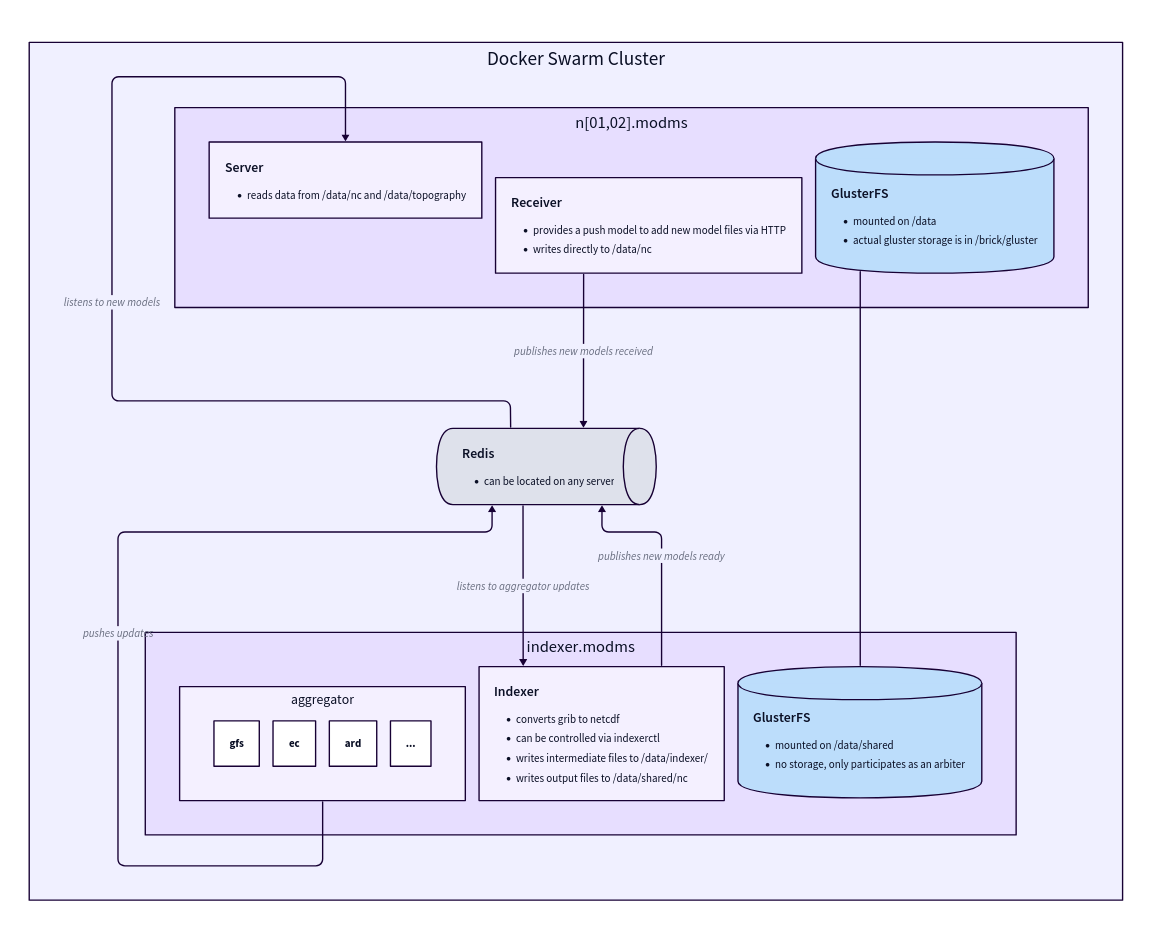
## Architecture Diagram
 ## Components
The data ingestion component responsible for downloading and preprocessing model data.
**Responsibilities:**
* Downloads models according to schedule
* Performs model-specific post-processing on GRIB files
* Notifies the indexer when new files are ready
* Must be on the same server as the indexer to share the filesystem
The Aggregator and Indexer must run on the same server to share the filesystem for efficient data transfer.
The data processing component that converts and prepares data for storage.
**Responsibilities:**
* Creates NetCDF files from GRIB files
* Copies output files to GlusterFS mountpoint
* Notifies the server of new model runs
* Responsible for naming variables consistently
Variable naming is critical for API queries. Ensure variables are properly defined in `grib[12].csv` files.
The API service that provides flexible querying capabilities for model data.
**Capabilities:**
* Provides a flexible API to query models
* Can plot maps in custom styles
* Supports custom functions and mathematical expressions in queries
* Handles multiple concurrent requests
**Query Features:**
* **Spatial queries**: Geographic regions
* **Temporal queries**: Time ranges
* **Variable-specific queries**: Filter by specific model variables
* **Mathematical expressions**: Aggregations and calculations
* **Custom visualization styles**: Custom map plotting
A push-based ingestion component for external data sources.
**Functionality:**
* Provides an HTTP endpoint to push new model runs
* Used for systems like APOLLO that need to inject data directly
* Bypasses the normal download schedule for real-time data ingestion
The Receiver is particularly useful for integrating with external systems that generate model data on-demand.
## Data Flow
The Aggregator downloads model data from external sources according to schedule.
Model-specific post-processing is applied to GRIB files.
The Indexer converts GRIB files to NetCDF format for efficient storage and querying.
Processed files are copied to the GlusterFS distributed storage system.
The Indexer notifies the Server of new model runs available for querying.
The Server makes the data available through its flexible API.
## Storage Architecture
ModMS uses **GlusterFS** for distributed storage, providing:
**Replication**
Data is replicated across multiple nodes for redundancy
**Consistency**
Maintains consistent state across different servers
**Scalability**
Easy to add new storage nodes as data grows
**High Availability**
Automatic failover in case of node failures
The GlusterFS mountpoint at `/data` must be properly configured and accessible. If issues occur, see the [FAQ](/data-ai/modms/faq) for troubleshooting steps.
## Servers & environments
Typical ModMS deployment uses:
* `n01.modms.devops.arabiaweather.com`
* `n02.modms.devops.arabiaweather.com`
* `indexer.modms.devops.arabiaweather.com` (Indexer server)
These nodes share the GlusterFS volume mounted at `/data` and host the Aggregator, Indexer, and Server components.
All ModMS nodes must have:
* GlusterFS peers in **Connected** state
* The volume mounted at `/data`
For operational commands and troubleshooting, see:
* [Why GlusterFS is used](/data-ai/modms/faq/why-glusterfs)
* [Mountpoint `/data` not working](/data-ai/modms/faq/mountpoint-not-working)
## GlusterFS Architecture Details
ModMS uses a replicated GlusterFS volume with:
* Multiple brick nodes for data storage
* Arbiter node for split-brain prevention
* Self-healing daemon for automatic recovery
* TCP transport for network communication
## Performance Considerations
The server scans all NetCDF files at startup, which can take approximately **3 minutes** with large datasets.
For cold starts, it's recommended to start with 2 container replicas and scale up once ready.
The Aggregator and Indexer must share a filesystem, requiring them to run on the same server.
NetCDF format is used for efficient querying and reduced storage overhead compared to raw GRIB files.
## Components
The data ingestion component responsible for downloading and preprocessing model data.
**Responsibilities:**
* Downloads models according to schedule
* Performs model-specific post-processing on GRIB files
* Notifies the indexer when new files are ready
* Must be on the same server as the indexer to share the filesystem
The Aggregator and Indexer must run on the same server to share the filesystem for efficient data transfer.
The data processing component that converts and prepares data for storage.
**Responsibilities:**
* Creates NetCDF files from GRIB files
* Copies output files to GlusterFS mountpoint
* Notifies the server of new model runs
* Responsible for naming variables consistently
Variable naming is critical for API queries. Ensure variables are properly defined in `grib[12].csv` files.
The API service that provides flexible querying capabilities for model data.
**Capabilities:**
* Provides a flexible API to query models
* Can plot maps in custom styles
* Supports custom functions and mathematical expressions in queries
* Handles multiple concurrent requests
**Query Features:**
* **Spatial queries**: Geographic regions
* **Temporal queries**: Time ranges
* **Variable-specific queries**: Filter by specific model variables
* **Mathematical expressions**: Aggregations and calculations
* **Custom visualization styles**: Custom map plotting
A push-based ingestion component for external data sources.
**Functionality:**
* Provides an HTTP endpoint to push new model runs
* Used for systems like APOLLO that need to inject data directly
* Bypasses the normal download schedule for real-time data ingestion
The Receiver is particularly useful for integrating with external systems that generate model data on-demand.
## Data Flow
The Aggregator downloads model data from external sources according to schedule.
Model-specific post-processing is applied to GRIB files.
The Indexer converts GRIB files to NetCDF format for efficient storage and querying.
Processed files are copied to the GlusterFS distributed storage system.
The Indexer notifies the Server of new model runs available for querying.
The Server makes the data available through its flexible API.
## Storage Architecture
ModMS uses **GlusterFS** for distributed storage, providing:
**Replication**
Data is replicated across multiple nodes for redundancy
**Consistency**
Maintains consistent state across different servers
**Scalability**
Easy to add new storage nodes as data grows
**High Availability**
Automatic failover in case of node failures
The GlusterFS mountpoint at `/data` must be properly configured and accessible. If issues occur, see the [FAQ](/data-ai/modms/faq) for troubleshooting steps.
## Servers & environments
Typical ModMS deployment uses:
* `n01.modms.devops.arabiaweather.com`
* `n02.modms.devops.arabiaweather.com`
* `indexer.modms.devops.arabiaweather.com` (Indexer server)
These nodes share the GlusterFS volume mounted at `/data` and host the Aggregator, Indexer, and Server components.
All ModMS nodes must have:
* GlusterFS peers in **Connected** state
* The volume mounted at `/data`
For operational commands and troubleshooting, see:
* [Why GlusterFS is used](/data-ai/modms/faq/why-glusterfs)
* [Mountpoint `/data` not working](/data-ai/modms/faq/mountpoint-not-working)
## GlusterFS Architecture Details
ModMS uses a replicated GlusterFS volume with:
* Multiple brick nodes for data storage
* Arbiter node for split-brain prevention
* Self-healing daemon for automatic recovery
* TCP transport for network communication
## Performance Considerations
The server scans all NetCDF files at startup, which can take approximately **3 minutes** with large datasets.
For cold starts, it's recommended to start with 2 container replicas and scale up once ready.
The Aggregator and Indexer must share a filesystem, requiring them to run on the same server.
NetCDF format is used for efficient querying and reduced storage overhead compared to raw GRIB files.